
Setting Trainer Currency Benchmarks
Your PD policy sets out how you keep trainers current in their industry and in training and assessment. A trainer currency benchmark puts that policy into RTOSafe. It checks every trainer against it and shows you who is falling behind before an auditor does.
Before You Start
Currency is checked using records you already keep:
- Trainer scope: the units each trainer delivers. See Assign Scope.
- Approved PD activities: industry PD mapped to units, and Training & Assessment PD. See Recording and Approving PD Activities.
- Verified industry roles: employment history linked to units. See Employment History.
Setting Your Benchmark
Turn on Enable trainer currency checking
Review the Industry currency and VET currency requirements and adjust them to match your PD policy, then save
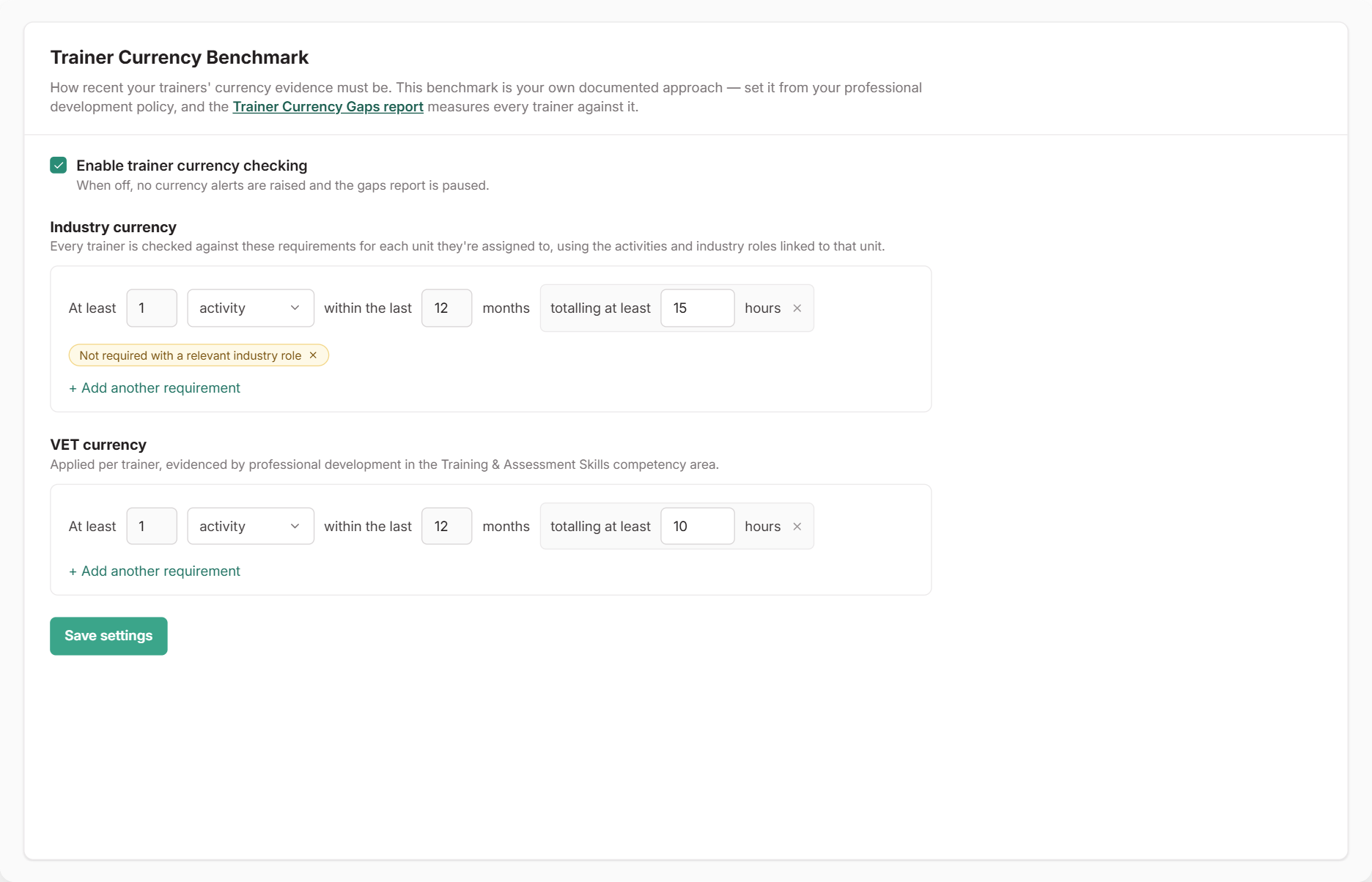
Each requirement reads like a sentence, for example: at least 1 activity within the last 12 months, totalling at least 15 hours. You can add up to four requirements per benchmark, and a trainer must meet all of them.
How Each Benchmark Is Checked
Industry currency is checked for each unit a trainer delivers. Only approved PD activities mapped to that unit count. You can let a verified industry role linked to the unit count instead of PD by choosing Not required with a relevant industry role.
VET currency is checked once per trainer. Approved PD in the Training & Assessment Skills competency area counts.
The benchmark applies to your whole organisation, so every trainer and unit is held to the same standard.
The starting values are a sensible default, not a rule. Set the benchmark from your own documented PD policy so what RTOSafe checks matches what you’d tell an auditor.
What Happens Next
- The Trainer Currency Gaps report shows each trainer who is below the benchmark or about to lapse, and what they need to do. See Reporting on PD.
- Your dashboard shows an alert when trainers fall below the benchmark.
- Trainers see their own status in the Staff Portal under My Currency, including which units need attention and when their currency next lapses. They can record an activity straight from there.
Activities waiting for approval are shown as pending. They don’t count until they’re approved.
Common Issues
A trainer's PD isn't counting toward a unit
Check that the activity is approved and mapped to that unit with Map Scope. Industry currency only counts activities linked to the unit being checked.
An industry role isn't counting
The role must be verified and linked to the unit, and the requirement must be set to Not required with a relevant industry role. See Employment History.
A trainer can't see My Currency
My Currency only appears when currency checking is turned on and the trainer has units assigned in their scope.